

Club Management
Stripe Payment API Guide for Coaches and Club Teams
A practical stripe payment api guide for coaches, clubs, and parents. Learn endpoints, Payment Intents, webhooks, and integration basics.

Rain is tapping against the clubhouse windows on a wet Tuesday evening. Twenty parents still owe £35 each for a winter tournament deposit, the head coach is chasing bank transfers, three parents have paid in cash, and one cheque is sitting in somebody's car. Meanwhile, the treasurer is reconciling a spreadsheet at midnight and trying to work out which payment belongs to which player.
That's the kind of everyday problem the Stripe Payment API can solve. It connects a club website or registration form to programmable payment tools for card payments, recurring fees, refunds, and payout records. Stripe's UK rollout began with a closed beta in March 2013, followed by its official UK expansion in August 2013, when UK businesses could accept major cards and currencies including GBP, USD, and EUR. Finextra's report on Stripe's UK launch captures why the API became practical for British online services.
Why the Stripe Payment API Matters for Coaches and Club Teams
A payment API isn't just a checkout button. It's a set of programmable endpoints that lets a club build payment actions around real activities, such as a one-off match fee, a tournament deposit, a season membership renewal, or a refund when a player withdraws.
For the coach, the improvement is simple. A parent opens the registration form, pays online, and receives a clear result. The club's system can connect that payment to the player, team, and event instead of leaving the treasurer to decode bank references later. Clubs can also use a payment platform such as Vanta Sports payment collection to bring fee assignment and payment tracking closer to their everyday administration.
The API gives different people the visibility they need:
- Coaches can see whether a player is cleared for an event.
- Parents get a familiar payment experience and a confirmation.
- Treasurers can match transactions with payouts and member records.
- Club administrators can process refunds without searching through paper receipts.
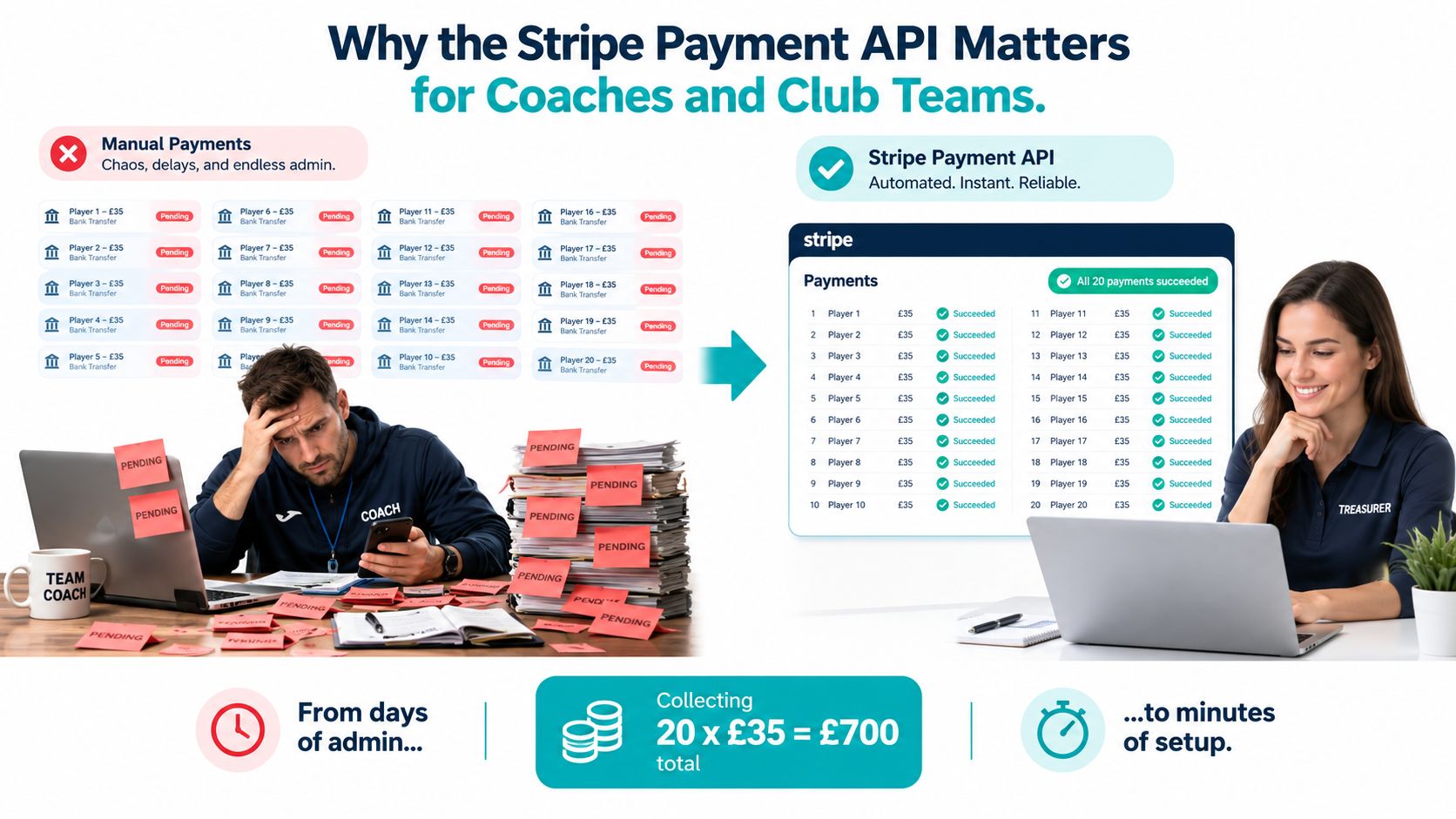
The important mental shift is to treat payment as part of the club workflow, not as a separate finance chore. A successful payment should update the member record. A failed payment should create a follow-up task. A refund should leave a trace in both Stripe and the club database.
You don't need to be a senior SaaS engineer to understand the moving parts. The practical path is to learn the main objects, test safely, handle authentication, listen for webhooks, and reconcile payouts regularly.
Core Concepts Every Stripe API User Should Know
The terminology can sound more complicated than the work itself. Think of the API as a conversation between your club system and Stripe.
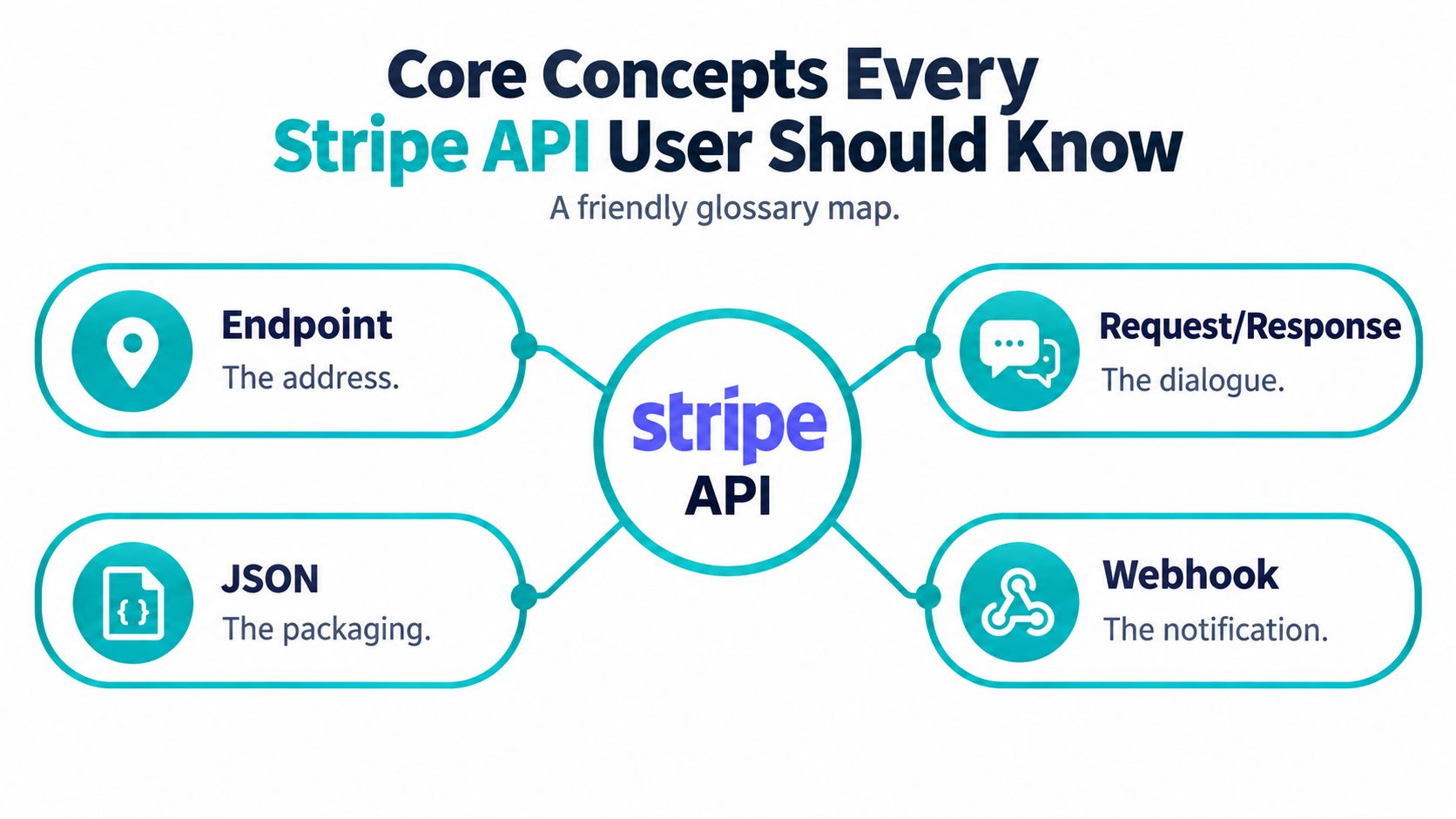
- API: A controlled way for one system to ask another system to do something. Your registration site asks Stripe to create a payment.
- Endpoint: The address for a particular action, such as creating or retrieving a Payment Intent.
- Request: The message your server sends. It includes details such as amount and currency.
- Response: Stripe's reply, usually containing an object, an ID, and a status.
- JSON: The structured packaging used to send and receive payment data.
- Webhook: A notification Stripe sends to your server later, like an office doorbell ringing after a payment changes state.
The Stripe objects fit into that conversation:
- API key: A credential that identifies your integration.
- Payment Intent: The central payment record. For a club, it might represent one parent's tournament fee.
- Setup Intent: A record for collecting and authenticating a payment method that will be used later.
- Customer: The Stripe record for a parent or guardian.
- Payment Method: The card, bank payment option, or other method selected by the customer.
- Charge: The money movement created during a payment.
- Event: Stripe's record of something that happened, such as a payment succeeding or a charge being refunded.
The Payment Intent is the object to follow for a one-off fee. The Setup Intent becomes important when a parent agrees to save a payment method for future membership charges. These terms will appear again in authentication, payment flows, and webhook handling, so learning them now makes the rest of the integration much easier.
Authentication, Test Mode, and API Versioning
A club developer can move from an empty Stripe account to a safe test call in a few organised steps.
First, create or access the Stripe account and open the Dashboard. Generate the API keys, then separate them by job. The publishable key can appear in browser code. The secret key belongs only on your server and should never be committed to a Git repository or placed in a public website.
| Key Type | Prefix | Where Used | Risk if Leaked |
|---|---|---|---|
| Publishable key | pk_ |
Browser and Stripe.js | Someone may identify your account context |
| Secret key | sk_ |
Secure server code | An attacker may make authorised API requests |
Next, use test mode before collecting real club money. Test mode uses the same broad endpoint patterns as live mode, but it keeps the activity separate from real balances and customers. Stripe's standard successful test card is 4242 4242 4242 4242, with any future expiry date and any three-digit CVC. Test scenarios should also cover declined cards and authentication challenges.
Finally, pin the API version used by your integration. A date-based version such as 2024-06-20 tells Stripe which request and response behaviour your server expects. Pinning protects a season-long registration form from changing unexpectedly. Stripe's Stripe payment app guidance is useful background for teams connecting app-based club payments to a wider member experience.
Keep the key rule visible beside the monitor:
Secret keys stay server-side, even for a volunteer project.
Inside the Payment Intents Object
A Payment Intent follows the payment from the parent's first checkout action to the club's final confirmation. It acts as the reliable record that your server can inspect instead of trusting what a browser happens to display.
Consider a parent paying a registration fee. The object can contain:
amountandcurrency, such as a value expressed in the smallest unit of GBP.payment_method_types, which describes the methods available to the flow.customer, linking the payment to the parent's Stripe record.confirmation_method, controlling how confirmation is handled.latest_charge, pointing to the resulting charge when one exists.client_secret, which lets the client confirm the payment without exposing the secret API key.next_action, describing extra work such as authentication.
The status tells the club what to do next. It shouldn't be treated as decorative text on a dashboard.
| Status | Parent Experience | Next API Action |
|---|---|---|
requires_payment_method |
No usable payment method has been added | Ask the parent to provide or replace one |
requires_confirmation |
Payment details are ready | Confirm the Payment Intent |
requires_action |
The card issuer needs extra authentication | Present the required authentication step |
processing |
Stripe is still processing the payment | Wait for the final event |
requires_capture |
Authorisation exists but capture is pending | Capture the payment if the club uses manual capture |
succeeded |
The parent sees confirmation | Mark the fee as paid after server verification |
canceled |
The payment attempt has been stopped | Close or restart the payment record |
The browser might show a success page before the server has received the final event. That's why the club database should use the Payment Intent status and webhook event as its source of truth. This approach helps prevent double charges, missed registrations, and a parent being chased for money they've already paid.
Building a Payment Intents Flow Step by Step
A complete flow has two halves. The server creates a payment safely, while the client collects payment details and displays the right next step.
Suppose the club needs a £45 U12 match fee. The server creates the Payment Intent in the smallest currency unit, identifies the currency, attaches useful metadata, and uses an idempotency key so a repeated request doesn't create a second payment.
const paymentIntent = await stripe.paymentIntents.create(
  {
    amount: 4500,
    currency: 'gbp',
    payment_method_types: ['card'],
    metadata: {
      player_id: 'player_123',
      team_id: 'u12-blue'
    }
  },
  {
    idempotencyKey: 'u12-blue-player_123-match_456'
  }
);

return res.json({
  clientSecret: paymentIntent.client_secret
});
The response sent to the browser should contain the client secret, not the secret API key. Stripe.js can then initialise with the publishable key, mount the Payment Element, and confirm the payment.
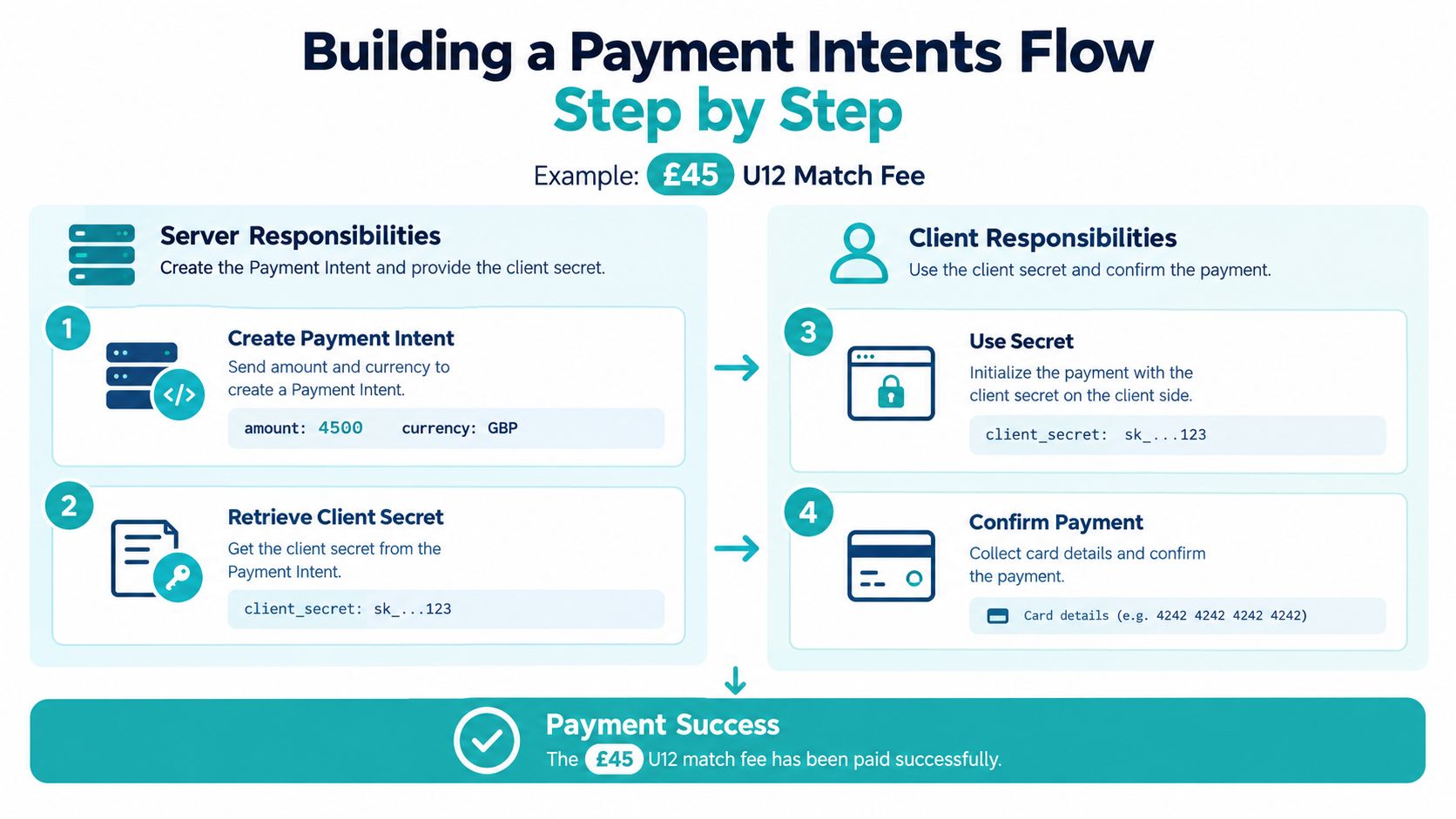
A simplified client-side pattern looks like this:
const { error } = await stripe.confirmPayment({
  elements,
  clientSecret,
  confirmParams: {
    return_url: ''
  }
});

if (error) {
  showPaymentError(error.message);
}
If the card requires extra verification, Stripe can move the intent to requires_action. The client handles the authentication experience, then returns the parent to the confirmation route. The server should still retrieve the Payment Intent or process the relevant webhook before marking the player as paid.
That final step matters. The club should update its member record only when the server knows the Payment Intent has reached succeeded, not just because the parent reached a browser page.
Watch the full flow in this practical walkthrough before adapting it to your own registration form:
Setup Intents for Recurring Club Memberships
A Payment Intent collects money now. A Setup Intent prepares a payment method for later use without charging the parent during setup.
That distinction suits recurring club fees. A parent might enrol a child in monthly training, provide card details during registration, and expect future charges to happen under the agreed membership plan. The club can create a Setup Intent on the server, pass its client secret to the browser, and let the parent confirm the card or wallet through Stripe.js.
After confirmation, the club associates the resulting payment_method with a Stripe customer. Future off-session charges can then use that saved relationship. The parent doesn't need to re-enter card details for every renewal, although the bank or card issuer may still require authentication in some situations.
A clear setup sequence looks like this:
- Create the Setup Intent: Associate it with the parent's Customer record where appropriate.
- Confirm on the client: Collect and authenticate the payment method through Stripe-hosted components.
- Store Stripe IDs: Save the Customer and payment method identifiers against the club's member record.
- Charge later: Use the stored method for the membership invoice or renewal.
- Handle failure: Notify the parent and give the club a clear follow-up state.
A failed renewal shouldn't remove a child from training unexpectedly. Subscription systems can emit an invoice.payment_failed event, allowing the club to send a dunning email, request a new payment method, or contact the parent. The card details remain within Stripe's payment components, which reduces the amount of sensitive payment data handled by the club's own systems. For a wider view of the surrounding workflow, see this guide to Stripe payment integration.
Webhooks and Event Handling for Club Operations
The browser is useful for showing a result, but it isn't a dependable accounting system. A parent can close the tab, lose connection, or return from authentication without your registration page receiving the expected response. Webhooks give your server a direct notification from Stripe.
Create a webhook endpoint in the Stripe Dashboard and store the signing secret, which begins with whsec_, in your server's secure configuration. Verify the raw request body with Stripe's constructEvent helper and apply a timestamp tolerance check before processing the event.
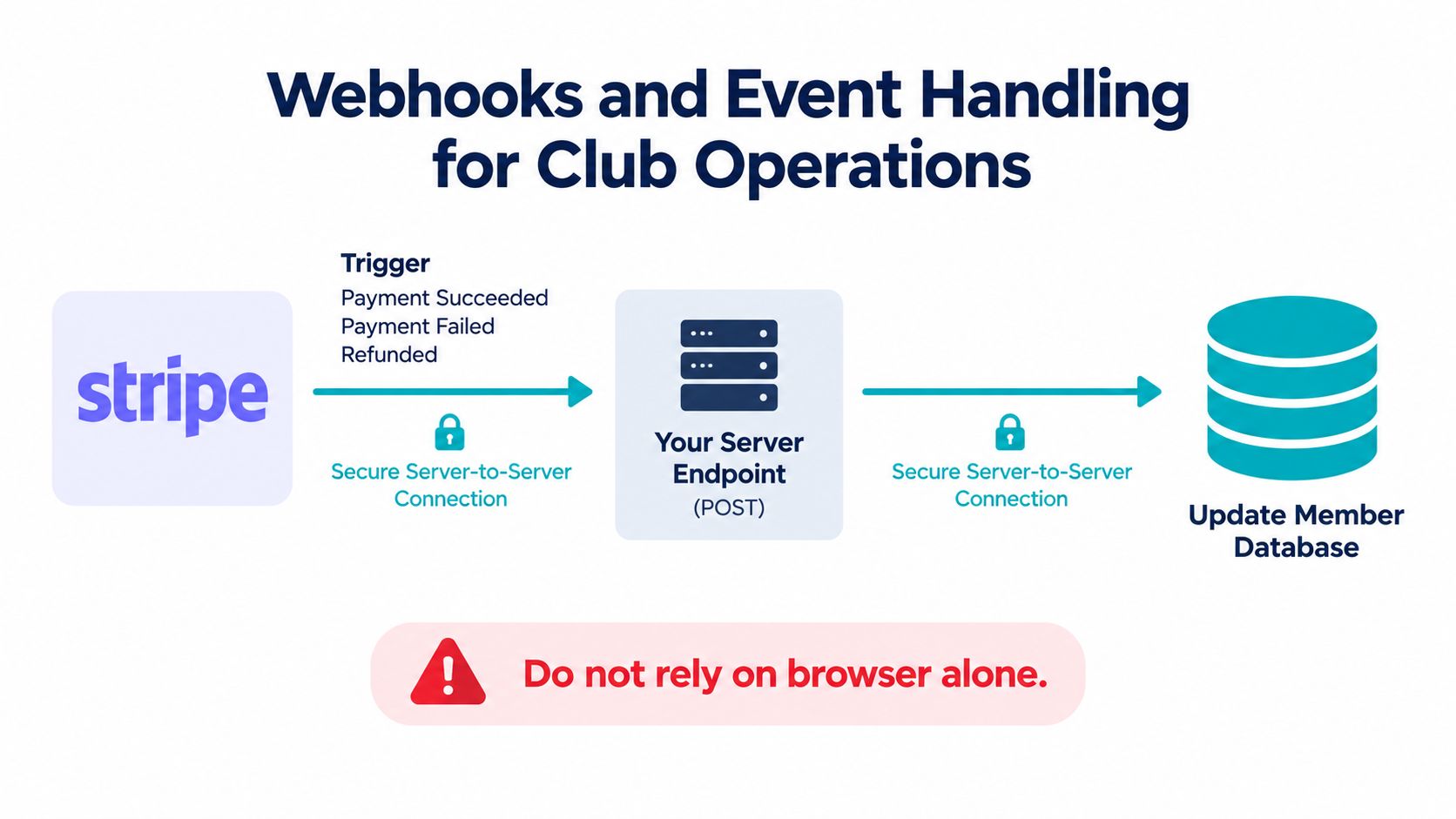
The club-facing meaning of common events is straightforward:
payment_intent.succeededconfirms a registration or match fee has cleared.payment_intent.payment_failedflags a declined or unsuccessful attempt.setup_intent.succeededrecords a payment method prepared for future fees.invoice.paidconfirms a subscription renewal.charge.refundedrecords a tournament withdrawal refund.payout.paidsignals that a payout has reached the club's bank account.
A small Node endpoint might look like this:
app.post('/stripe/webhook', express.raw({ type: 'application/json' }), (req, res) => {
  const event = stripe.webhooks.constructEvent(
    req.body,
    req.headers['stripe-signature'],
    process.env.STRIPE_WEBHOOK_SECRET
  );

  if (alreadyProcessed(event.id)) {
    return res.sendStatus(200);
  }

  switch (event.type) {
    case 'payment_intent.succeeded':
      markMemberPaid(event.data.object);
      break;
    case 'charge.refunded':
      markRefunded(event.data.object);
      break;
    case 'payout.paid':
      recordPayout(event.data.object);
      break;
  }

  storeEventId(event.id);
  return res.sendStatus(200);
});
Store each event ID before business processing can run twice. Return 200 quickly, then use a queue or background worker for heavier tasks. This keeps club operations responsive and reduces unnecessary webhook retries.
Choosing the Right Payment Method for UK Clubs
The best payment method depends on the job. A card is usually familiar for a one-off registration. A bank-based method may suit a recurring plan or a parent paying a larger fee who prefers not to use a card.
Stripe's UK documentation lists standard UK card payments at 1.5% plus 20p, while EU cards are charged at 2.5% plus 20p. Stripe's UK payments features page provides the current card pricing reference. Transaction pricing depends on the method selected by the customer, so clubs shouldn't model every payment with one assumed rate. Stripe's UK pricing page explains that distinction.
| Payment Method | Stripe Fee | Settlement Time | Parent Experience | Best Club Use Case |
|---|---|---|---|---|
| UK card | 1.5% + 20p | Confirm the current timing in the Stripe Dashboard and account terms | Familiar card checkout with immediate payment feedback | Match deposits and registration fees |
| EU card | 2.5% + 20p | Confirm the current timing in the Stripe Dashboard and account terms | Familiar checkout, with pricing based on card origin | Parents using EU-issued cards |
| Pay by Bank | Varies by payment method and account terms | Confirm current availability and settlement terms | Bank authorisation through open banking | Parents who prefer a direct bank payment |
| Bacs Direct Debit | Varies by payment method and account terms | Confirm current availability and settlement terms | Bank-account collection suited to planned payments | Membership renewals and training plans |
Stripe's UK Pay by Bank documentation supports GBP transactions from £0.50 to £10,000 and describes a private-preview recurring flow that requires connected-account capability. Read the UK Pay by Bank documentation before promising a recurring bank flow to members.
The practical decision is less about offering every option and more about matching the method to the parent's situation. Keep the checkout clear, show the total before confirmation, and test refund and failure paths for every method you enable. Clubs can also explore this Stripe payment gateway overview when planning how payment choices fit into a wider sports platform.
Strong Customer Authentication and 3D Secure in Practice
Strong Customer Authentication, or SCA, applies to customer-initiated online and contactless offline payments within the UK or Europe, subject to exemptions and scope. Stripe's UK guidance says electronic payments such as card payments and bank transfers require SCA unless an exemption applies or the transaction is out of scope. See the Stripe UK SCA guidance for the regulatory detail.
For a club, the important point is that authentication can appear during checkout without the developer building a separate bank challenge system. The Payment Intents API tracks the payment lifecycle and triggers additional authentication when required. Stripe identifies 3D Secure 2 as the primary authentication method for meeting European SCA requirements in card payments.
A parent might enter card details for a match fee and then see a bank verification screen. Your client code handles the next_action, often through Stripe.js and the Stripe SDK, while the server waits for the final status. The Payment Intent may move through requires_action or processing before reaching succeeded.
Stripe recommends the Payment Intents API for payments and the Setup Intents API for cards collected for future use. Those APIs let a club design one-off deposits and recurring membership setup around the same authentication model, rather than stitching together separate legacy flows.
The right user experience is calm and direct. Tell the parent that their bank may ask for an extra check, keep the payment page available during the challenge, and display a clear outcome afterward. Your webhook should still confirm the result before the club marks the player as paid.
Keeping Up With 2026 API Changes and Version Pinning
A Stripe integration isn't a build-once project. The API evolves, and a club registration form may remain in service long after the volunteer who built it has moved on.
Stripe's 2026 changelog lists breaking and non-breaking changes, including removal of the payment_method_types parameter from PaymentIntents and SetupIntents, new payment methods such as UPI, and new product surfaces including Managed Payments and Account Signals APIs. Review the Stripe API changelog directly because the payment surface can change while a club is between seasons.
Stripe also recommends version-pinning instead of relying on the account's default version. That gives your integration a known contract. Without it, a dashboard-level change can alter a response shape or accepted parameter while the club's code still expects the old behaviour.
Use a small maintenance routine:
- Check monthly: Review the changelog for Payment Intents, Setup Intents, Billing, webhooks, and UK payment methods.
- Test separately: Run the candidate version in a sandbox or controlled test environment.
- Exercise the whole cycle: Create a payment, complete authentication if triggered, receive the webhook, issue a refund, and reconcile the resulting records.
- Deploy deliberately: Upgrade outside a tournament or registration deadline, with a rollback plan.
A club whose payment form breaks during a tournament isn't suffering from bad luck. It's paying the cost of an integration nobody maintained. Pinning the version and assigning a named owner turns API maintenance into a manageable fixture on the club calendar.
Quick-Reference Best Practices for Stripe Integrations
Print this checklist before reviewing a volunteer developer's pull request. Each item protects a different part of the club's payment trail.
- Prevent duplicate creation: Send an idempotency key with every Payment Intent creation request. A parent double-clicking the submit button should not create a second charge.
- Keep secrets private: Use the publishable key in browser code and the secret key on the server. Never place the secret key in frontend JavaScript or source control.
- Read structured errors: Log and handle
error.codeanddecline_coderather than showing every failure as “payment failed”. A parent needs a useful next instruction. - Trust events for refunds: Build refund bookkeeping around
charge.refunded, not only the state of a confirmation page. - Reconcile payouts: Match Stripe payout reports with registrations, match fees, refunds, and the club bank statement.
- Store stable links: Save Stripe
customerandpayment_methodIDs alongside the club's member record. - Make webhook handling repeat-safe: Store the event ID and ignore a duplicate event that has already been processed.
- Review adjacent payment patterns: Teams that handle bookings or trips may find this guide to payment integration for tour businesses useful for thinking about deposits, cancellations, and reconciliation.
The GOV.UK Pay reporting API documentation shows why reporting detail matters in UK operations. Where Stripe is the payment service provider, the guidance says funds are typically received in a bank account within 2 working days of the captured date when the customer pays during the week. It also describes reporting and CSV data that expose transaction fees, payout totals, and the individual transactions behind each payout.
Treat reconciliation as part of payment development, not as a treasurer's afterthought. A successful API call is only one step. The club still needs to know which member paid, which payout contains the transaction, and whether a later refund changed the balance.
Putting It All Together for Your Club Workflow
Before registration opens, set up the season in Stripe. The treasurer creates a Product for registration, then adds a Price for the fee and billing arrangement. Your website can use that Price to show parents the correct option, whether they are registering a new player or paying a match deposit.
A parent submits the form and enters card details through Stripe's client-side components. Your server creates and confirms the Payment Intent, adding metadata such as the player and team IDs. Stripe returns the payment result. If authentication is needed, the parent completes it in Stripe's flow, so the club does not handle sensitive card data directly.
The webhook then connects payment activity to club administration:
- Receive
payment_intent.succeededon the club server. - Check the event signature and stored event ID.
- Change the member record from unpaid to paid.
- Send confirmation to the parent.
- Include the transaction in the treasurer's reconciliation.
- Match the payout record with the club bank account.
A refund should follow its own recorded path. An administrator starts it in Stripe, saves the reason in the club system, and waits for charge.refunded before changing the registration balance. Keep the original payment record, so the club can explain what happened later.
For UK operations, the GOV.UK Pay reporting documentation illustrates why transaction-level status and payout visibility matter. Its documented endpoints, including GET /v1/payments/{PAYMENT_ID} and GET /v1/payments/{PAYMENT_ID}/events, show the value of records that staff can inspect beyond a successful checkout screen.
Before the next registration window, create the season Product and Price, run one test payment from start to finish, and confirm that the webhook changes the member record to paid.
If your club wants membership plans, match fees, guardian payments, and team administration together, Vanta Sports offers integrated Stripe billing and connected tools for administrators, coaches, guardians, and players.
Tags